
OVERALL RATING: 85. GRADE: B. SkyCaddie bills itself as “the #1 rangefinder in golf,” and its polished interface and functionality made this claim credible in the past. We’re not so sure it’s as clear cut from here on out. The SG5 features an unmatched number of user settings to controls views on the device, which is a big plus. We’ve revisited this review in connection with the latest software update for the SG5, which now allows the user to record scores and statistics, view overhead hole graphics and see major green contours and false fronts. But the new features are a bit cumbersome and difficult to use, leaving us feeling that they were stitched into the SG5’s user interface in a patchwork manner. Granted, SkyCaddie provides the caveat that these new features are a “beta” release, but given that SkyCaddie has already released the new SkyCaddie SGX, the notion that they will spend much time in properly integrating these features into the SG5 may be an unrealistic expectation.
Our original impression was that while the SG5 does a nice job of delivering basic yardages, it didn’t have enough pizzazz to ascend into our upper echelon of golf GPS devices. After testing the latest software update, we still aren’t comfortable giving the SG5 a bump up in score/grade, so we kept it where it was – the new features just don’t have the fit and finish that we expect from SkyCaddie. Note that with the introduction of the SkyCaddie SGX, the retail price of the SG5 has been reduced to under $300, and it is no longer the highest priced device in our analysis of the three-year total cost of ownership (which includes required annual subscription fees or per course download fees). But it’s still squarely in the middle of the pack in terms of pricing, which makes it hard to promote as a value purchase.
Pros:
- Bright and easy to read color screen
- Easy navigation
- High level of user customization
Cons:
- Highest annual fee
- Heaviest and one of the most bulky units tested
- Can’t add targets to existing courses
Retail price: $399.95
SETUP
The Good: Detailed step-by-step instructions via their new course management software make setup a snap. SkyCaddie has been doing this longer than most of its competitors, and it shows in their customer support materials. We also appreciated having a light that indicates when the unit has finished charging.
The Bad: Not much – the entire process is well laid out and is simple for even the non-computer savvy. While it would have been nice not to have the additional step of moving courses to a “Favorites” folder, this is necessitated by the maximum of 15 courses (10 SkyCaddie-mapped courses and 5 user-mapped courses) that can be stored on the device. The process of moving to the latest software from an older SG5 produced serious complications both in syncing and using the device on the course, and required multiple support calls to fix (although a nice feature is that if you use the online support and install the support software, the technician then has the ability to control your computer remotely to help diagnose the problem).
Details:
- Required steps. Setting up the SkyCaddie SG5 is similar to most other devices we tested, and involves:
- registering on their web site to create an account;
- choosing and purchasing a membership plan (ranging in price from $29.95 to $59.95);
- installing course management software (CaddieSync) on your computer;
- using CaddieSync to search for and select the courses you want to load to the SkyCaddie and adding them to your “favorites” (CaddieSync will indicate what features are available for each course – for example, the new HoleVue and Intellisync Pro maps are only available for a subset of the courses within SkyCaddie’s database); and
- connecting the SkyCaddie to the computer via a USB cable and “syncing” the courses to the device.
- Time required for setup. The entire set-up process took about 15 minutes in total. This included 5 minutes to download the course management software, install and then restart to finish the installation. It took us another 4 minutes to create an account online and launch the software. Selecting a membership plan, and thereafter searching for and transferring 10 courses to the SG5 took another 6 minutes. SkyCaddie will not warn you if you select more than 10 courses, so if you do so you may accidentally be left without the course you need.
What’s in the Box: The SkyCaddie SG5 comes with:
- USB cable
- Wall charger
- Belt clip
- SkyCaddie SG5 User Guide
- Quick Start Guide
- Quick Setup Overview
- Installation CD (note that Mac users will need to download the software via the SkyCaddie website as the included CD is not Mac-compatible)
Required Downloads: Mac users must download:
- CaddieSync for Mac course management software
The SkyCaddie SG5 requires users to sync their device to view old scorecards and statistics. This transfers your scores to your ClubSG account (free with annual membership plans), and you can then view your scorecards and statistics online.
COURSE AVAILABILITY
Critical Golf Test: We originally thought that the SkyCaddie SG5 had 100% coverage in our course coverage test, but re-visiting the database showed that a couple of the courses were only user-mapped, which we don’t count. Still, 98% ain’t bad, and it goes without saying that SkyCaddie’s coverage is exceptional across all regions of the United States and all course types. Well done, SkyCaddie!
Be forewarned if you are looking at the SG5 because of the availability of the new HoleVue and Intelligreen Pro features. Skycaddie only scored 42% in our analysis of courses covered with both of those maps. We expect SkyCaddie to make a strong push to increase this coverage, as those features are critical as they try to differentiate the SkyCaddie SGX from its competitors.
Manufacturer’s Claims: SkyCaddie claims to have nearly 30,000 courses available in its course database, placing it amongst the top of devices tested.
EASE OF USE
The Good: The device has an intuitive interface for the vast majority of functionality. The SkyCaddie SG5 is also smart enough to stop showing you the distance to a target once you have proceeded past that target.
The Bad: The SkyCaddie SG5 is the heaviest device in our test, and feels rather bulky in the pocket during play. Finding the screen to enter scores and statistics can be a mystery if you are not using the setting to auto-prompt you for this information, or if you pass by the scoring screen and move to the next hole before entering information.
Details:
- Buttons. The device features a scroll pad (which you would expect to be able to depress, but rather only lets you navigate menus up and down and position the crosshair when in green view – actually selecting any option must be done with the buttons), two soft keys, and buttons for power, mark shot, information, menu, and hole selection.
- Screen. Although the SkyCaddie SG5 screen is only average sized, it is bright and clear and makes good use of the accompanying graphics. There was an unusual amount of scratching and scuffing to the screen through normal use, much more so than other golf GPS devices. While this had nothing more than a cosmetic impact, it was still odd to see on a high-end unit.
- Form Factor. As mentioned above, the device comes in at 5.5 ounces, making it the heaviest device in our comparison. SkyCaddie aficionados can take heart that the SG5 is actually lighter than its older sister device, the SkyCaddie SG3, but new users may still find the SG5 a larger device than they desire.
- Starting a Round. The SkyCaddie lists all the courses loaded onto your device in order of distance to your location so you can quickly select your course. After selecting the course, the user must also select the hole on which to start the round.
COURSE DETAIL AND MAPPING
The Good: Solid detail is provided on most courses, including distances to the end of the fairway on doglegs (a level of detail that few devices provide). The SkyCaddie SG5 has up to an amazing 40 points mapped per hole (although we rarely saw more than 12 points actually mapped). An excellent graphic of the green rotates based on the user’s position and provides precise data on the distances to the edges of the green closest and farthest from the user (which is far more useful to those of us who occasionally spray the ball off the fairway than just data to the points of the green closest and farthest from the tee box). The SG5 is now able to provide full hole graphic images (HoleVue) and detailed green views, including major contours and false fronts (Intelligreen Pro), although these are only available on a subset of the courses in SkyCaddie’s database.
The Bad: The features added in the latest software update (HoleVue and Intelligreen Pro) seem to have been stitched into the SG5’s user interface with some duct tape and twisty ties. When using HoleVue (full graphic images of the shape of the hole), you must endure what seems like an interminable wait each time you switch to this view, or zoom in or out, as the SG5 actually draws or redraws the entire image before your eyes (first cart paths, then tree shadows, trees, fairway, bunkers and at last the green). Note that HoleVue on the SG5 only provides an overhead image to give you a sense of the shape of the hole and the general position of hazards – you cannot click on the image to get a distance to a specific point or the distance from that point to the hole.
Similary, when using Intelligreen Pro to move the location of the flagstick, the SG5 keeps trying to redraw the entire green, and as a result, the image will flash so quickly that it is essentially blank, obscuring the lines that indicate contours or tier. So if you are trying to determine a distance to a particular point on the green, you will need to remember the approximate location, adjust the crosshair, wait for it to redraw the contours, and then adjust again.

Details:
- Views. There are a number of different views available on the SG5 – four different target views (standard, graphical, expanded and big number), a simplified view with only the distance to the center of the green only, a green-only view, and for select courses, new “safe route” (QuickVue) and full hole (HoleVue) views, and an enhanced green view showing green contours (Intelligreen Pro). Users can cycle quickly among the target views, and the Skycaddie SG5 even goes further to allow users to customize the rotation and remove views they don’t use.
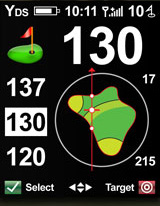
- Standard target view – This view always shows the distance to the center of the green and also shows distances to the next three targets that the user will approach. The targets are identified solely through text (i.e. BkrLtCy would appear indicating the distance to carry the left bunker). Users can choose to have the SG5 automatically move through the targets as they or passed, or to manually scroll through the list.
- Graphical target view – Similar to the standard target view, the graphical target view always shows the distance to the center of the green plus the three targets that will be next encountered, but adds small graphic representations of the green and target. These graphics look a bit hokey, but help clarify exactly what the indicated target actually is (i.e. in the example given above for BkrLtCy, there will be a small graphic of a bunker, with a line across the top indicating that it is the carry distance).
- Expanded target view – Displays more detail on any target selected from the standard or graphical target views, showing in larger print the distance to that target with the accompanying graphic, and additional provides the distance from that target to the center of the green. This is great information for players who want to plan one shot ahead.
- Big number target view – Displays in a very large font the distance to a target selected from the standard or graphical target views, with a graphic of the target and the target descriptor (ie BunkerLt). Users can cycle through different targets while remaining on this view.
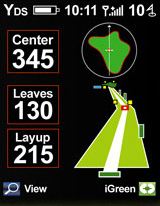
- Safe route view (not yet available on all courses) – A feature we tried but don’t imagine using on a regular basis, this view (QuickVue) displays a 3D-like view of the hole to indicate the safest route of play. With fairway and obstacles all fairly blocky, we found it easier to spend our time in one of the other views.
- Hole view (not yet available on all courses) – With the latest software update, SkyCaddie has added an impressively detailed graphic hole view (HoleVue), down to the position of cart paths (add about 100 yards to your drive by aiming at these). HoleVue offer up to three levels of zoom. These images do not have an indicator for player position, target distances, nor do they rotate based on player position. The only distance displayed is to the center of the green.
- Green view – SkyCaddie’s “Intelligreen” shows a map of the green, along with the distance to the near, center and far points of the green (and dots on the green map to indicate the location of those near, center and far points). Our reviewers loved that the green shape and distances are relative to where the user is on the course, which provides the most relevant data. Using the movable crosshairs, users can also select any point on the green to find the distance to that point. With the latest software update (Intelligreen Pro), SkyCaddie is adding major contours, tiers, false fronts and mounts to the green view. Absolutely fantastic detail. Keep in mind this level of detail is still in development, and may not be available on the courses you play.
- Hole Information. The hole number, par and hole handicap are shown when entering the hole and also are readily accessible by pressing the dedicated “info” button.
- Custom Mapping. As mentioned above, the SkyCaddie SG5 has an unusual approach to custom mapping – limiting users to mapping an entire course and saving it, but not allowing users to edit the existing maps created by SkyCaddie. Unlike some other golf GPS devices, when mapping an entire course with the SG5, the only points that can be saved are for the front, middle and back of the green (there is no ability to map hazards and other targets).
Suggestion Box: We were disappointed to see that the course detail for one resort course that hosts a PGA tournament omits key targets, and had older markings for a bunker configuration that had been renovated over two years ago. We have also seen, though rarely, “layup” points marked with no reference as to the layup distance (or why the location was chosen).
FEATURES
The Good: The SkyCaddie SG5 provides most of the general features you would expect to have in a golf GPS device, and has an unmatched number of user-adjustable settings. Now with the ability to track scores and statistics, the SG5 has the majority of features users need.
The Bad: The look and feel of the scorecard isn’t as polished as on the latest devices, but it gets the job done.
Details:
- Shot Tracking. The device has a nice shot tracking interface for measuring the distance of a user’s shots.
- Scores and Statistics. With the new software release SkyCaddie moves from the world of pencil and paper scoring to a digital scorecard. This only tracks the basics, including score, putts and fairways hit or missed left/right (all only for one player) – the SG5 does not track greens in regulation, sand saves, penalty shots, et al. Users can select if they want to be prompted at the end of each hole to enter this information. When viewing the scorecard, you can cycle between scorecard views containing score, over/under, and score relative to your handicap for each hole, along with running totals for the first and second nine.
- CaddieSync and ClubSG (Still under development). Up to 10 rounds can be saved on the SG5, and only the scorecard for the round underway can be viewed. Upon syncing, the scorecard(s) get erased from the device, and are saved to CaddieSync and for web-based viewing on SkyCaddie’s “ClubSG” site. ClubSG is still working out a number of kinks, and we found ourselves with error messages and unable to view scorecards, although we could still see hole scores and +/- relative to par.
- Auto-Advance. The device will automatically advance to the next hole, or users can elect to manually advance between holes.
- Preferences. SkyCaddie provides a wealth of settings that can be adjusted on the SG5, including whether to show detailed green targets, whether the front or the center of the green is the green reference distance, the distance at which the device will automatically switch to the green view, the distance at which the device will no longer show a target, power save functions (auto power off and backlight), and even the color theme.
For more details, check out the Critical Golf comparison of golf GPS device features.
ACCURACY
Device Accuracy: We experienced no distance accuracy issues in our tests, with all distances within the acceptable range of plus or minus 4 yards.
Mapping Accuracy: We tested the SkyCaddie SG5 on a variety of courses and had no problems with the accuracy of the course mapping either. Distances readings are available at any distance from a target or the green (some devices stop showing readings within a certain number of yards of a target or the green), thus we were able to develop confidence in the SkyCaddie SG5’s displayed distances even at short range.
COST/VALUE
Retail Price: With the introduction of the SkyCaddie SGX, the SG5 now retails for a mere $299.95, making it the lowest priced full-featured device tested. For those who already own an SG5, the software updates are available for $20.
Fees for Access to Course Database: SkyCaddie owners must choose one of three membership plans to access the course database, which are priced at $29.95/year for unlimited courses in one state (each additional state costing $10/year), $49.95/year for unlimited courses in the United States, and $59.95/year for unlimited courses worldwide.
Three-Year Total Cost of Ownership: Our test of the three-year total cost of ownership, which makes assumptions on the number of new courses a user will want to access each year, found the SkyCaddie SG5 to be about average at $419.80.
Value: The SkyCaddie SG5 is a very good device with solid accuracy and user settings, and a new lower price. But gadget freaks will find newer and shinier devices elsewhere, and the SG5 isn’t really priced low enough to qualify as a value purchase.


i just recently purchased an SG5 on eBay…my biggest problem is with the battery life. it could just be a bad battery, but was wondering if the settings can be causing the problem…is the 14 hour life realistic to expect….Bob
i just recently purchased an SG5 on eBay…my biggest problem is with the battery life. it could just be a bad battery, but was wondering if the settings can be causing the problem…is the 14 hour life realistic to expect….Bob
We generally see operating time on the order of 10-20% less than manufacturers’ claimed times. So with a new rechargeable battery, you should receive at least 11 hours. If you aren’t getting that much time, make sure the Auto Backlight (AutoBkLight) setting is set to ON, or adjust the brightness level (under Preferences>Backlight). If none of those help extend the battery life enough, new batteries run about $40 (Amazon: https://amzn.to/aDwmlW).
We generally see operating time on the order of 10-20% less than manufacturers’ claimed times. So with a new rechargeable battery, you should receive at least 11 hours. If you aren’t getting that much time, make sure the Auto Backlight (AutoBkLight) setting is set to ON, or adjust the brightness level (under Preferences>Backlight). If none of those help extend the battery life enough, new batteries run about $40 (Amazon: https://amzn.to/aDwmlW).
I would expect a detailed explanation of each button on the front of my SG5. Also, I pushed something that created a new course and I can find no way to delete it. I would appreciate your help with these questions. I purchased my unit today and have not visited any golf courses. One other question: how can I find out the courses in my favorites?
I would expect a detailed explanation of each button on the front of my SG5. Also, I pushed something that created a new course and I can find no way to delete it. I would appreciate your help with these questions. I purchased my unit today and have not visited any golf courses. One other question: how can I find out the courses in my favorites?
We leave the greatest level of detail for the User Manuals (see SkyCaddie SG5 User Manual at https://bit.ly/91WbUV). You can find detailed explanation of each button on your SG5 on page 3-4, and how to delete a course you created on page 15. You can find your SkyCaddie Favorites using SkyCaddie’s CaddieSync desktop software (in manual on pages 5-6).
We leave the greatest level of detail for the User Manuals (see SkyCaddie SG5 User Manual at https://bit.ly/91WbUV). You can find detailed explanation of each button on your SG5 on page 3-4, and how to delete a course you created on page 15. You can find your SkyCaddie Favorites using SkyCaddie’s CaddieSync desktop software (in manual on pages 5-6).
We leave the greatest level of detail for the User Manuals (see SkyCaddie SG5 User Manual at https://bit.ly/91WbUV). You can find detailed explanation of each button on your SG5 on page 3-4, and how to delete a course you created on page 15. You can find your SkyCaddie Favorites using SkyCaddie’s CaddieSync desktop software (in manual on pages 5-6).
We leave the greatest level of detail for the User Manuals (see SkyCaddie SG5 User Manual at https://bit.ly/91WbUV). You can find detailed explanation of each button on your SG5 on page 3-4, and how to delete a course you created on page 15. You can find your SkyCaddie Favorites using SkyCaddie’s CaddieSync desktop software (in manual on pages 5-6).
We generally see operating time on the order of 10-20% less than manufacturers’ claimed times. So with a new rechargeable battery, you should receive at least 11 hours. If you aren’t getting that much time, make sure the Auto Backlight (AutoBkLight) setting is set to ON, or adjust the brightness level (under Preferences>Backlight). If none of those help extend the battery life enough, new batteries run about $40 (Amazon: https://amzn.to/aDwmlW).
Where can I donload the instruceion book for the SG5
can you have more than one device synced to a plan with the sg5