
Editor’s Note: We have updated the review below to reflect the release of version 3.4 of Golfshot (in Fall 2012), which is iOS 6 ready – we tested it on an iPhone 4S, because sadly, we do not yet have an iPhone 5 (er, yet…).
Golfshot is our favorite golf GPS application for the iPhone, not only providing a tremendous feature set, but also delivering great value, even as one of the most expensive apps on the market (and at a price of $29.99, it’s not really going to break the bank unless your primary source of revenue is the Tooth Fairy).
Golfshot provides both a text list of distances for a number of targets on each hole and overhead satellite images with the ability to zoom and pan on each hole. The design of the scorecards and statistics, along with the ability to view the data on either your mobile device or online on your computer, is simply fantastic. An exceptional range of user settings is the icing on the cake.
We could go on (and if you’ve read some of our reviews, you’re aware that rambling for page upon page is well within our capabilities), but will instead simply state that if you are searching for an iPhone golf GPS application, look no further than Golfshot.
Pros:
- Satellite images with ability to zoom and pan
- Can determine distance to any point on the hole, and distance from targeted point to the center of the green
- Large number of targets and hazards marked
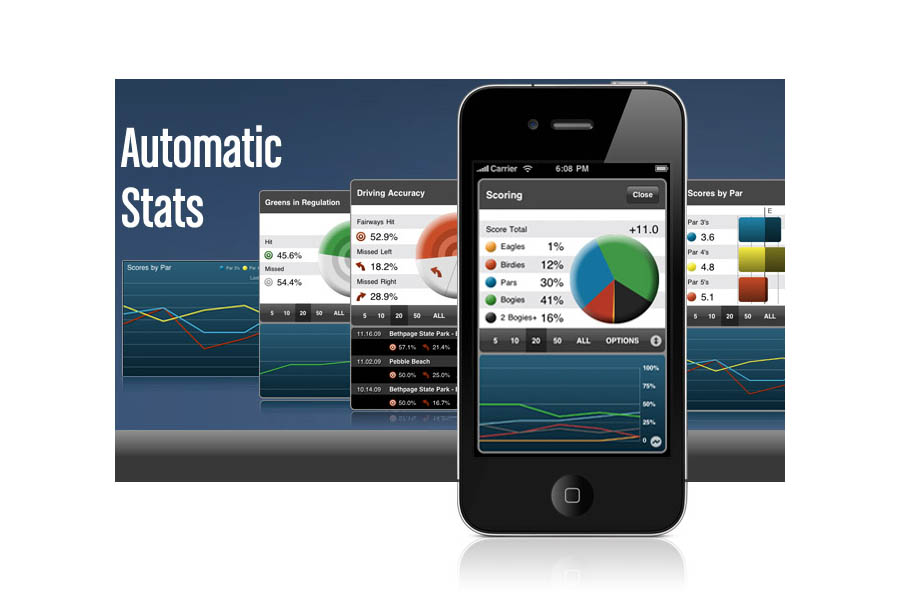
- Extremely well designed statistics tracking, both on the iPhone and online
- Wide variety of preference settings
Cons:
- Course images download at launch, often requiring players to wait for the satellite images to initially appear
- Can consume the etnire battery during a round (so make sure to go into sleep mode between shots)
- No ability to add target points to pre-mapped list
Price: $29.99
Download Golfshot from iTunes
COURSE AVAILABILITY
Critical Golf Test: Golfshot ties for tops in our comparison of course coverage for iPhone applications, coming in at a perfect 100%!
Manufacturer’s Claims: Golfshot claims to have 40,000 courses in its database worldwide, which places it tops among its iPhone application competitors.
STARTING A ROUND
The Good: Golfshot starts to load all satellite images when you begin the round, so in most cases there is no delay as you move either between zoom levels within a hole or advance between holes. And unlike some iPhone golf GPS applications, Golfshot allows you to begin play as soon as the first hole images are available, rather than forcing you to wait until all course images are loaded. Even better, if you are playing in a shotgun event, Golfshot will load the hole you advance to first then process the others afterwards – the only application tested that does so.
The Bad: As with any iPhone golf GPS application, it can take up to a few minutes to load the images for even just one hole, depending on wireless coverage, so it’s best to launch Golfshot before heading to the first tee (or better yet, prior to heading to the course).
Details: From the main menu, you have the choice to either Play Golf or, if you haven’t ended the last round, resume a round in progress. When you choose to Play Golf from the main menu, you can view a list of nearby courses (listed by distance from your current location), a list of courses you have played in the past, browse for courses, or search for a course by name. You then simply select the course, select the tees you will play, the starting hole (if other than hole #1), add golfers to your round for scoring, and begin. If you are playing in a new region, don’t forget to turn on syncing for that region to make sure courses are available. If you forget, courses in that region won’t appear in the nearby list nor will you be able to search for them.
EASE OF USE
The Good: Golfshot has the cleanest and most user-friendly interface of all the iPhone golf GPS applications we tested. Two screens provide all of the distance information you need, one through images and one via text (see ‘Course Detail and Mapping’, below). Holes are always shown from the same viewpoint, with a blue dot indicating the player’s position. Easy to access menus and navigate screens.
The Bad: We would prefer if some key target distances were provided within the satellite image, simply to have some context to start the hole. In addition, understanding some of the nuances of the interface requires either playing a number of rounds or reading the manual (the nerve!). These little tricks are fantastic for both conveying a vast amount of information in a nice clean display or allowing quick access, but may not be intuitive to the first time user. Fortunately, users can download and view the user manual from within the application.
Details:
- Buttons. Like other iPhone golf GPS applications, everything is accessed through touchscreen buttons – those buttons that appear on screen and are touched to navigate the application.
Upon launching the application, users are presented with a screen with big buttons that can be selected to: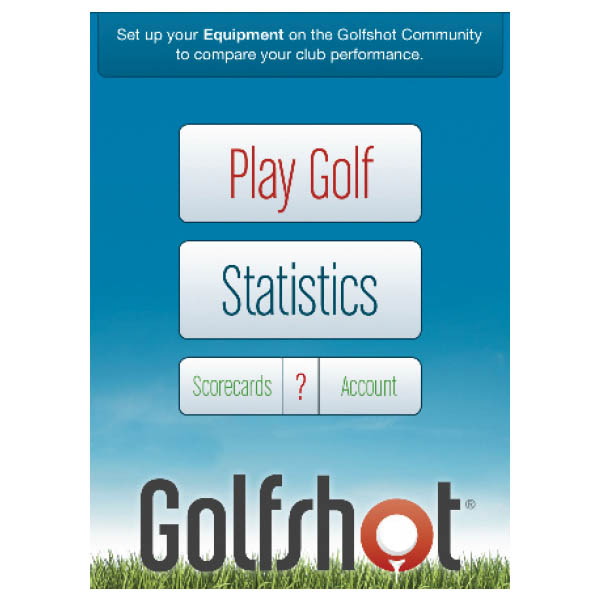 Click for large view
- Play a round (or resume your round, which is a useful option in case you exit the Golfshot application and then return),
- View historical statistics,
- View scorecards from past rounds, or
- Adjust account information/user settings, including entering your clubs (which feeds into the clubs from which you can select when entering statistics), selecting whether the scoring and statistics functions are enabled, et al.
Buttons are clearly labeled and intuitive. The user interface generally allows accessing different features without returning to a main menu – for example, the same row of buttons generally appears at the bottom of every screen, allowing the user to go to the next or previous hole, change hole views, utilize the scorecard or access information about the hole. This type of design makes the application easy to learn and easy to use, and is something we hope more application designers will copy.
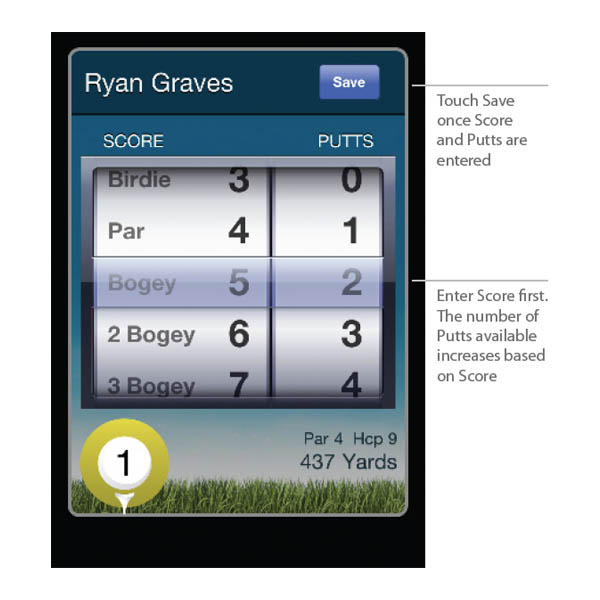
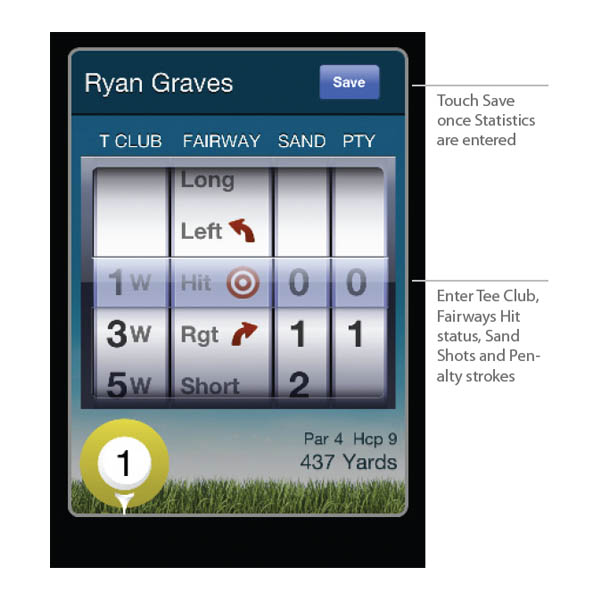
Entering score and statistics is a cinch – Golfshot uses slot-machine style rollers (to which most users of iPhone applications are accustomed) for entering data, see ‘Features’ section, below. And as mentioned above, you can even turn off some of the functionality or buttons if you prefer to keep things simple.
- Battery Life. Every iPhone golf GPS application that we tested, including Golfshot, was a battery hog unless managed tightly. If you use Golfshot regularly throughout the round and don’t power down, you can burn through a full charge in the course of a five-hour round. If you lock the phone when not in use, you can constrain battery usage to under 50% during a round. Golfshot also enables the user to keep the GPS on while dimming the screen in order to preserve battery strength without foregoing quick access to distance readings. See our intro to iPhone golf GPS applications for additional ways to conserve battery life during play, and we highly recommend the purchase of an iPhone battery pack.
COURSE DETAIL AND MAPPING
The Good: The ability to select any point on the course and receive both the distance to the point and the distance from the point to the green. Golfshot also provides a comprehensive listing of hazards/targets on the hole.
The Bad: No ability to add custom points to the list of targets. Distances to pre-mapped targets are not displayed in the satellite view.
Details:
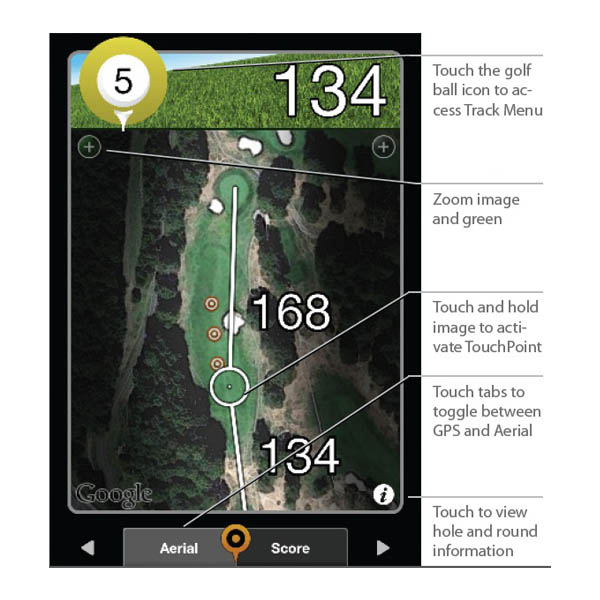
- Views. Golfshot keeps the interface nice and clean through its Aerial and GPS Target views. At 250 yards from the center of the green, the Aerial view will automatically advance to a view of the green and approach area, and the Target will show the distance to the green in a larger font (the cost of which is that it will list one fewer target point in order to make room on the screen).
- Aerial view – The Aerial View is an overhead satellite image view of the hole that provides (a) three levels of zoom, (b) the ability to place the crosshair anywhere on the hole to receive both the distance to the selected point and the distance from that point to the green, and (c) the ability to pan up, down and side to side on the satellite image. The zoom (“+”) button will focus on the center of the green, or users can double-tap the screen to zoom in where touched (allowing players to zoom up to two times). If layup targets are activated, they will be displayed on the center of the fairway (see more on layup targets below). On many apps and stand-alone golf GPS devices, when the user places the crosshair, the distance to that point appears below the crosshair and thus is usually blocked from view by the user’s finger. Golfshot deals with this nicely by briefly displaying that distance at the very top of the screen, where the distance to the center of the green is normally shown. This type of attention to detail is top-notch.
Since the initial release, Golfshot has added a “FocusView” option, which shades the areas outside of the hole and allows the player to more quickly focus on hole shape, and is marketed toward making it easier to read in sunlight (we aren’t sure about the latter, but we do like the focus on the hole in play).
- GPS Target view – The GPS Target view is a text listing of all mapped hazard/target points on the hole. Our experience was that the Golfshot provides the most comprehensive set of hazards/targets of any of the iPhone golf GPS applications we tested (we saw up to 17 points mapped on one hole, and Golfshot claims that it maps up to 40 points on a hole). As a bonus, the “Layup Distance” feature enables users to enter four distances and corresponding clubs, and the targets will then appear both in the Aerial view and the GPS Target view (below). As with many features of the Golfshot application, users have the ability to turn off the layup distance functionality. Unfortunately, these clubs/distance pairings are not linked to your club average distances if you are tracking those (see below under “Shot Tracking”).
- Aerial view – The Aerial View is an overhead satellite image view of the hole that provides (a) three levels of zoom, (b) the ability to place the crosshair anywhere on the hole to receive both the distance to the selected point and the distance from that point to the green, and (c) the ability to pan up, down and side to side on the satellite image. The zoom (“+”) button will focus on the center of the green, or users can double-tap the screen to zoom in where touched (allowing players to zoom up to two times). If layup targets are activated, they will be displayed on the center of the fairway (see more on layup targets below). On many apps and stand-alone golf GPS devices, when the user places the crosshair, the distance to that point appears below the crosshair and thus is usually blocked from view by the user’s finger. Golfshot deals with this nicely by briefly displaying that distance at the very top of the screen, where the distance to the center of the green is normally shown. This type of attention to detail is top-notch.
- Hole Information. The hole number and par are available on all views. Hole handicap is available on the information screen, which is accessible through the Aerial and Target screens.
- Custom Mapping. Golfshot does not allow users to add custom hazards and targets to the course map. As described above, however, it does allow users to add up to four custom layup points, which will appear in both the GPS Target (as target symbols) and Aerial views.
Suggestion Box: It would be useful to have the distances to certain hazards/targets available on the Aerial View, so users could quickly see distances to specific points without having to touch the screen to select them. We also would like an easy way to clear targeted points from the screen (without advancing a hole and then returning, as is currently required).
FEATURES
The Good: Golfshot has the strongest set of features and settings available on any iPhone golf GPS application. Moreover, the excellent design makes the features and settings easy to find and easy to use.
The Bad: Auto advance to the next hole would be nice.
Details:
- Shot Tracking. Golfshot has the ability to track the distance of shots. The method of activating the shot tracking (you touch the hole number) is probably the least intuitive design choice – but it’s there, and once you learn where it is, it’s easily accessible. Through the new ‘Track Menu’ you can quickly access your club averages to see your average distances, shot location result (left, center or right), and even the number of shots to use in calculating these numbers. The new menu isn’t entirely obvious – if you want to both track your shots and also add each shot distance to calculate the average distance you hit your clubs, you have to engage in two different processes. In addition, if you are tracking and calculating distance averages for the same shot, you’ll need to re-enter the same club you used and the location of the shot. And if you are keeping stats for the hole, you’ll have to enter the shot location result for the drive…yet again. One last note – you can only delete a club distance from being included in the club average if you have tracked the shot as well.
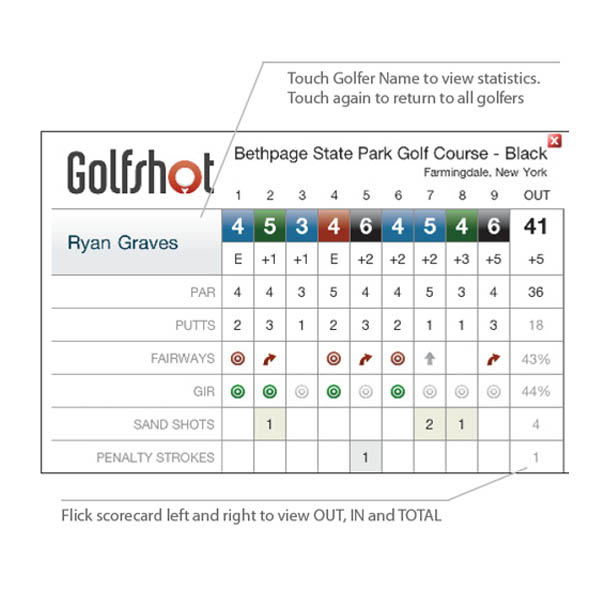
- Score and Statistics. Golfshot provides standard inputs for scoring (score and number of putts), along with the ability to enter the club used off the tee, the location of the drive (fairway, or miss left/right), the number of sand shots, and the number of penalty strokes. Scoring is available for up to eight players.
- Golfshot is smart enough to restrict the entry of certain statistics based on what is actually possible for the hole – i.e. you won’t be able to enter that you had a 5 on the hole with 4 putts and 2 penalty strokes. It may seem minor, but again, it’s this type of detail that sets Golfshot apart. There are also statistics available for each hole, so you can see your historical averages for each hole for fairways hit, GIR (Golfshot does a calculation to back into whether or not you had a GIR based on score and putts), score and putts.
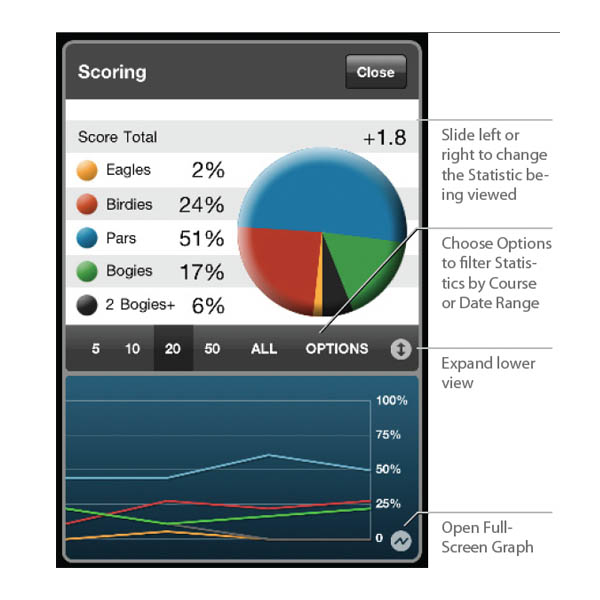
- You can pause (this will not save your scorecard, but keeps it available to start the next time you launch Golfshot) or save a round at any time. When you save a round, the scorecard will be automatically e-mailed to you, nicely formatted with a link to the full set of statistics available online (along with historical scorecards and statistics). Statistics are available both during the round or online following the round (the same information is available on both). Users also may change scores and statistics after the round in case a mistake was made. Impressively, users can select a date range or last number of rounds and view statistics for that custom period.
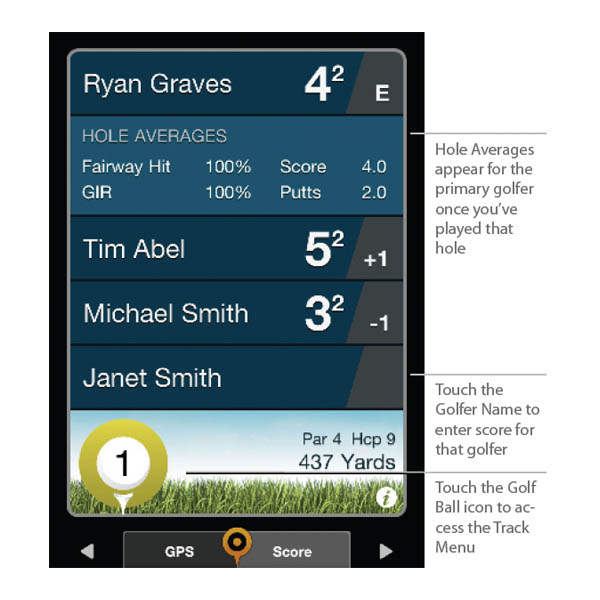
- If scoring for just one, the main scorecard screen will show the score, putts, fairways hit, GIR, sand and penalty information, as well as score relative to par through that point in the round. If keeping score for two or more players, the main scorecard screen will only show the score and score relative to par. Want to see the stats for a specific player? Just press on their name and the full assortment of tracked stats appears. Again, not intuitive, but it’s easy enough to access once you learn where to find it.
- Auto-Advance. Golfshot will not auto-advance from hole to hole, so the user needs to manually advance to the next hole.
- Preferences. Golfshot enables the user to modify a wide variety of settings, including the ability to turn off most of the features. Users can thus simplify the application as much as desired. Hey, choice is a good thing!
The barrage of preference settings includes customizing layup distances and clubs (mentioned previously), hole statistics, aerial view, the display of handicap strokes received per hole, yards vs. meters, what clubs are in your bag, what geographical region of courses to regularly sync and more. If you have purchased Golfscape, the augmented reality application available from the makers of Golfshot, you will also have the ability to toggle it on and off.
Suggestion Box: After account preferences are changed, Golfshot will give the users the option to “Sync” or “Cancel” to return to the previous screen. When you receive options like this, you can go ahead and hit “Cancel” and your setting will be saved. The “Sync” button will force the app to check for course updates, which is usually not what you want to do during the round – this should be clearer. Also, we would prefer if users were able to go directly to a hole to edit scores or stats if there was an error, instead of having to advance through each hole sequentially.
MAPPING ACCURACY
Mapping Accuracy: Golfshot showed solid mapping accuracy – in our test rounds on a variety of courses, we found the distances displayed by Golfshot to stay within 4 yards of those displayed by marked tee boxes and sprinklerheads.
COST/VALUE
Retail Price: At $29.99, Golfshot carries the highest initial price in our comparison test.
Fees for Access to Course Database: There is no cost to access the course database. All courses and updates are included within the cost of the application.
Three-Year Total Cost of Ownership: With only a one-time fee of $29.99, Golfshot is average in our three-year cost comparison across applications.
Value: The Golfshot golf GPS application for the iPhone provides the best value for the money among the applications we tested, offering the best features and functionality at an extremely reasonable price. It’s worth every penny.
Tested: v3.4


One Response