
Editors’ Note: OnPar went out of business on July 31, 2011. SkyCaddie had a trade-in offer for OnPar owners for the new SkyCaddie SGX that was available until September 30, 2011. If you are considering purchase of an OnPar now from eBay or elsewhere, know that OnPar has turned off the ability for owners to download additional courses so chances are you won’t be able to use the device (unless by luck you live in the same area of the previous owner who already had downloaded all the courses you want to play).
With its iPhone-esque touch screen, the OnPar Touchscreen GPS qualifies as one of the the shiniest and sparkliest units on the market. The device has a strong feature set, including overhead views of each hole, reasonably detailed green views, the ability to determine distances to any point on the course, and easy tracking of a plethora of statistics.
We first reviewed the OnPar Touchscreen GPS in 2009, shortly after its release, and had issues with some bugginess in the software and with the sparse course coverage. We recently had occasion to revisit the device, and we were pleased to find that OnPar has done a nice job of remedying the software bugs and incomplete course coverage we encountered earlier. One continuing complaint is that OnPar doesn’t pre-mark any distances on the hole maps other than the front/middle/back of the green.
The improvement in the device warrants higher marks, and the OnPar now grades out with a 90, good for an “A-”. Gadget freaks won’t be disappointed in the “wow” factor they get from their friends when they pull out the OnPar. A couple of tweaks here and there and the OnPar would be ready to compete for top honors.
Pros:
- Easy tracking of scores and statistics
- Overhead hole maps
- Intuitive interface
- Can determine the distance to any point on a hole
Cons:
- Distance to hazards not marked
- Hole view can be challenging to use, particularly selecting a target point
- Distances may not be initially be visible on the screen, but rather require users to zoom out to pan to see
Retail price: $349.00
Availability: Company went out of business on July 31, 2011
Setup
The Good: The process is simple and the interface is intuitive. The Quick Start guide is descriptive, and we encountered no glitches in getting up and running.
The Bad: When the user launches the course synchronization software on the computer, the program only runs in the background until the device is plugged in with the USB cable. In other words, it’s confusing to the user as to whether the software has been launched or not. OnPar’s FAQs address the issue, but it would be nice if the Quick Start instructions provided guidance as well. Sadly, the OnPar isn’t compatible with Macs.
Details:
- Required Steps. Setting up the OnPar is similar to most other devices we tested, and involves:
- registering on their web site to create an account;
- installing course synchronization software on your computer;
- searching for and selecting the courses you want to load to the device; and
- connecting the OnPar to the computer via a USB cable and “syncing” the courses to the device.
- Time Required for Setup. OnPar’s Quick Start guide does a nice job of sketching out an orderly process that took a total of 16 minutes from start to finish, about 7 minutes of which was spent downloading and installing the course synchronization software on a PC. The course searching process is easy and straightforward, as is loading courses on to the device. OnPar makes it simple to request mapping of a course that isn’t currently available, and grants priority to mapping a course that a user identifies as his or her “home course.”
Suggestion Box: During the set-up process, OnPar presents the user with two different versions of the desktop synchronization software that can be downloaded, which are identified as 32-bit and 64-bit. Unfortunately, they don’t explain the difference between the two. Even if they assume that gadget-heads who are already using 64-bit operating systems will know what to use, it would be nice if they provided some indication of which version is relevant for the rest of us.
What’s in the Box: The OnPar comes with:
- USB cable
- Wall charger
- Protective rubber case
- Wrist strap
- Quick Start Guide.
Required Downloads:
- Desktop synchronization software
- OnPar User Manual
Course Availability
Critical Golf Test: OnPar has made huge strides since its release, and now has a solid 90% coverage in our course coverage test, finishing in the top half of devices tested. The OnPar has relatively fewer “Best New” courses (16 out of 20), and courses in the Northeast (16 out of 20) mapped, but we are pleased to see such improvement in a short amount of time.
Manufacturer’s Claims: OnPar claims to have approximately 14,500 courses in its database, which puts in near the bottom in manufacturer’s claimed coverage for devices tested.
Ease of Use
The Good: The OnPar stores up to 300 courses, so the user is unlikely to need to swap new courses in and out because of storage capacity constraints (we would note that playing more than 300 courses on a regular basis is a high-class problem to have, and one we’d like to acquire). Finding distances to a general area (where precision is not critical) is as easy as touching the point on the screen.
The Bad: Hazards and other points are not marked on the OnPar’s maps; rather, the device presents an overhead illustration of the hole. When the user touches a point on the hole, an icon of a golf ball is placed on the picture, and the distance to the golf ball icon is indicated, as well as the distance from the icon to the green. In our experience, pinpointing a particular spot, like the edge of a bunker, required zooming in on the hole as much as possible, followed by a painstaking and delicate process of fine-tuning the position of the icon on the screen by nudging it back and forth. Note that to move the icon, the user puts his finger on it…which then obscures his vision of the icon, making it difficult to determine where the icon is on the map (this will be even more difficult for users with large fingers). We had similar problems in indicating our position with the “track shot” feature – the touch screen just doesn’t lend itself to precision. Perhaps this gets easier over time, but it didn’t exactly scream “easy to use” to our reviewers.
We also note that when zoomed in to precisely identify a target, the distance displayed may be beyond the edges of that screen – forcing the user to zoom out to see the distance, and then zoom back in if they want to adjust the target point. It’s like trying to set up a TV satellite dish on your own, shuttling back and forth between the dish on the roof and the TV in your living room to see if the dish is pointed in the right direction to pick up a signal.
Details:
- Buttons. As would befit a touch screen device, the OnPar only has a single button, which serves as both a power button and to take the device in and out of sleep mode. Accessing menus and zooming and panning around the screen are all done through the touch screen.
- Screen. The color screen is bright, and the largest among the devices tested. The screen will automatically increase brightness in sunny conditions.
- Touchscreen sensitivity. The color screen is bright, and the largest among the devices tested. The screen will automatically increase brightness in sunny conditions. Panning across holes isn’t as smooth as one would find with an iPhone, but it was generally acceptable.
- Form Factor. The OnPar is similar in size to larger cell phones. For some perspective, the OnPar is to an iPhone as Rumer Willis is to Demi Moore – you can definitely see the resemblance, but it’s a bit shorter, wider, and thicker. The width is a bit more than ideal (we’re talking about the OnPar, not Rumer Willis) for sliding in an out of a pocket, particularly if the protective rubber case is used, but it’s not ungainly. The device comes in at a reasonable 4.5 ounces (as tested).
- Starting a Round. After powering up the device, the user needs to select the desired course. If the device has acquired satellites, the courses are listed in order of proximity to the current location; otherwise, the courses are listed alphabetically. After a course is selected, an overhead drawing of the entire course is then presented, and the user can touch any of the holes to see the detail of that hole and begin play. It is a bit unusual to select the hole by graphic instead of scrolling through a menu, but it works.
Suggestion Box: In order to more accurately place the golf ball icon on the screen, it might be useful to allow the icon to move even when the user’s finger is touching the screen in the approximate area of the icon, such as 1/2” below or to the side, allowing the user to better see the point where they are setting the target.
Course Detail and Mapping
The Good: The ability to determine the distance to any point and to pinpoint the precise position of a target on the green provides tremendous flexibility. With the touch of a finger, users can stand on a point and save that point to the hole map, and the device will show the distance to that point in future rounds.
The Bad: We would have liked to have seen OnPar add pre-marked distances to targets and hazards to its ability to determine the distance to any point on the hole, similar to the approach taken by the Callaway uPro (albeit through a cursor, rather than a touch screen). Without pre-marked distances, the user is forced to spend time on each hole checking distances to various hazards or targets – a user experience more akin to the use of a laser rangefinder, but without the same level of precision. Thankfully, as indicated above in “The Good” and below in “Custom Mapping”, OnPar makes it easy for users to customize the map with hazards or layup points.
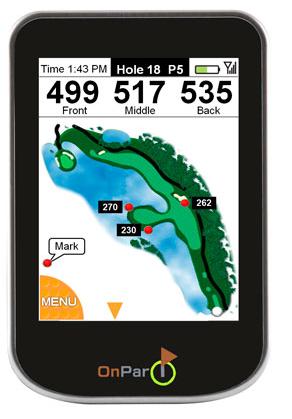
Details:
- Views. There are two views available – a “hole view” which shows an overhead illustration of the hole, and a “green view”. The distance to the front, middle and back of the green are displayed at the top of these views.
- Hole view – The user can pan around on the illustration of the hole with the touch screen, and can zoom in and out using a sliding button on the touch screen. As indicated above under “Ease of Use”, touching a point on the hole will display the distance to that point, and the distance from that point to the green. The hole view always displays the distances to the front, middle and back of the green at the top of the screen. The OnPar can also provide an overlay on the hole view that shows radiating bands (with different color lines) at 250, 200, 150 and 100 yards from the center of the green.
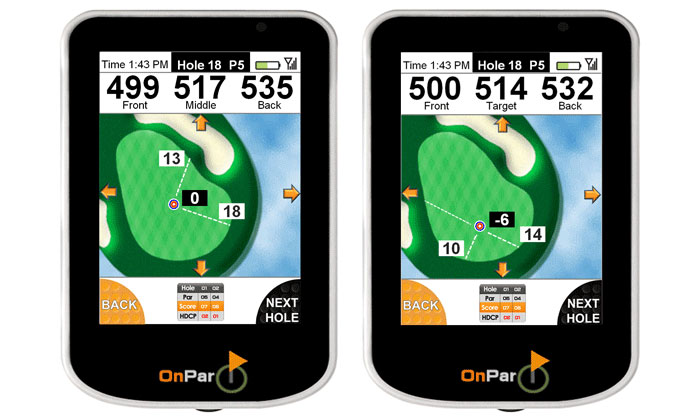
- Green view – Shows the shape of the green and some surroundings, and allows the user to either touch any point on the green to indicate the flagstick position and determine the distance to that point, or use arrow buttons on the touchscreen to nudge the flagstick position in increments of one yard. This view also shows the distance from that point to the front or back edge of the green (whichever is closest to the flackstick position, and based on the angle of approach from the user’s current position) and the nearest lateral edge of the green (i.e. the user can find the point that is five yards from the front edge of the green and 10 yards from the right edge of the green). Unfortunately, the orientation of the green view is always fixed – it does not rotate based upon the user’s angle of approach. Dotted lines indicate the line of approach. Users can move into green view at any time by touching on the green, or allow the OnPar to automatically move to green view at approximately 50-65 yards.
- Hole Information. The hole number and par are always visible on the “hole view” and “green view” screens. Hole handicap is not available.
- Custom Mapping (“OnMark”). Users can easily add their own custom points to a hole map by standing on the point to be mapped and pressing a button. That point will remain mapped for future rounds, and the device will indicate the distance from the current position to that point. The availability of this feature overcomes much of our concern about the lack of marked hazards.
Suggestion Box: The hole view is an illustration of the hole, rather than a photograph, which, while perhaps not as accurate as a satellite view, allows the hole image to be seen more easily in bright light. OnPar would benefit from modifying the color of the trees in the hole graphics, which in bright light are challenging to differentiate from the rough.
Features
The Good: The OnPar is chock full o’features, and is particularly good about tracking prior performance. Gadget lovers will enjoy exploring the capabilities of the device over time.
The Bad: We’re not really sure of the utility of a lot of the features. We did encounter issues when a user accidentally touches certain edges of the screen while in shot tracking mode, the result being they may not be able to delete the accidentally recorded shot, and can wind up compounding the error when trying to delete it. This is an interface issue that should be fixed.
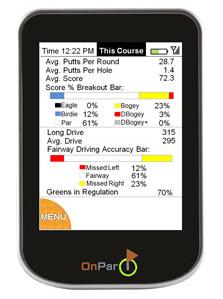
Details:
- Shot Tracking. The device has a simple interface for tracking shots and for indicating the club used on each shot. A unique feature of the OnPar is that if a user tracks shots through a round, the next time the user plays that course, the device can display the tracked shots from the prior round (“OnShots”). Reviewing shots from past rounds during play isn’t particularly useful for us, but perhaps is for some. If users are tracking club distances, updated average distances only become available on the OnPar beginning one day after the round, in order to conform with USGA rules.
- Scores and Statistics. The touch screen shines in how easy it is to track scores and statistics – score and putts are input by pressing either the “plus” button or “minus” button on the screen. During one of our test rounds, we noted an incorrect number for par on one hole – unfortunately, the OnPar does not allow users to modify the scorecards. Fairways hit and greens hit in regulation are logged by touching a check box on each hole. If the user is using the shot tracking function, the device will prompt the user on whether a fairway was hit or if the green was reached in regulation. Statistics displayed will include average putts per round and per hole, average score, long drive, average drive, fairway hit accuracy, and greens in regulation.
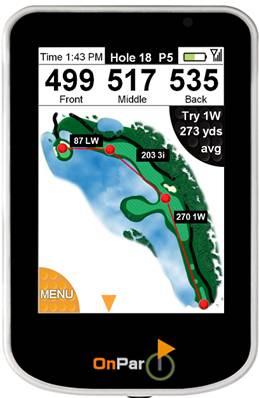
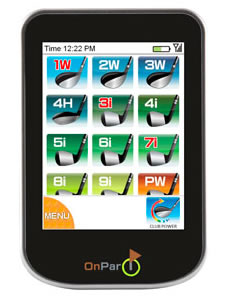
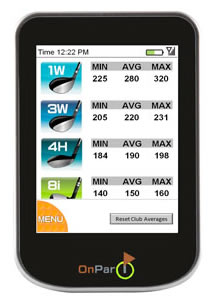
- Club recommendation (“OnClub”). If the user tracks shots and the clubs used for each shot, the OnPar will calculate the average shot distance with each club over the prior 18 rounds, and based upon that calculation, provide a recommendation for the club to be used at a given distance. This function can be turned on and off. The OnPar will track minimum, average, and maximum distances for each club tracked.
- Auto-Advance. The device will automatically advance to the next hole when in hole view, or the user may manually advance to the next hole.
- Preferences. Users can select to turn on and off such features as the display of colored yardage arcs on the hole display (a useful option), whether to display distances to selected points, display shots from the previous round, and modify the clubs in your bag.
For more details, check out the Critical Golf comparison of golf GPS features across all devices tested.
Accuracy
Device Accuracy: We experienced no distance accuracy issues in our test of device accuracy, with all distances within the acceptable range of plus or minus 4 yards. The OnPar does take longer than other devices to acquire satellites to start the round and to provide distance readings during the round. It was only on the order of a few seconds, but we became accustomed to pausing to get the most accurate reading before putting the OnPar back in our pocket.
Mapping Accuracy: We tested the OnPar on a variety of courses and had a few course mapping issues. One egregious error was that on one course, the holes were mislabeled – holes 1-9 were labeled holes 10-18, and vice versa. We also experienced a number of holes where fairway bunkers, in landing areas no less, were not displayed, as well as areas of wild rough and grasses incorrectly shown as bunkers.
The device will stop showing distance readings when the user is within 5 yards of the green, but a cutoff distance that close didn’t affect our general testing of accuracy (some devices cut off distance readings inside of 30 or 50 yards, which may give some indication that they are less confident in their accuracy).
Cost/Value
Retail Price: The OnPar’s retail price of $349 puts it on par with most of the full-featured golf GPS devices tested.
Fees for Access to Course Database: Balancing the cost of the device itself is the fact that there are no fees for access to OnPar’s course database. That’s far better than just “on par” (oh come on, you knew we were going to use that sooner or later).
Three-Year Total Cost of Ownership: Since there is no cost for access to the course database, the three-year total cost of ownership of the OnPar is $349 (the cost of the device itself), puts it in the middle of the pack in our cost comparison.
Value: With its touch screen and other features, the OnPar definitely is among the tops in terms of “cool factor” (although we will continue to bemoan the lack of pre-marked hazards and targets). The lack of fees for accessing the course database is great, and the price of the device is at the same level of other full-featured GPS devices. The OnPar is one of a select group of top-end devices on which we would actually consider spending our own money.


Got a great deal at Golf Galaxy(1/2011)
It took 2hrs. 55min to charge from less 10%, time was as manual stated.
Initial setup, Registration/download software and set up account.Total time 8 min.(Google Chrome)
I selected 35 courses for my account. Time not applicable due human error or course spelling and correct city.
Sync/Download/Unpack courses to OnPar 9 minutes.and no problems.
Took unit to local club to determine if it would acquire…Outside temp. 17 degrees 6″ snow on ground and gray overcast sky. Within 5 min. correct course acquire along with distances to other courses.
So far I’m impressed, but until courses open here in Columbus, OH won’t be able to fully test.
What was the Golf Galaxy price? It’s not on their website. TGW is $270.
$50.00 Closeout price…used it 10-12 times and glad I didn’t pay full price.
No longer carried by Golfsmith or PGA store. If not to late could not recommend.
It would take me to long to describe all problems,
As a follow up to my posting 2 mos ago +. Used it on 3 courses in cental Ohio, in my opinion, excellent visuals,and distances.
Display froze once but quickly resolved. Did not use scoring stuff as I didn’t purchase for that reason.
I’d recommend using tee for touchscreen vs fingertip. Screen size excellent for aging golfer using reading glasses.(Could not read my buddies SG5 or SG4).
As of now, only complaint is the 3 min. suspend mode, which was a pain in the _ _ S.
I have found that as soon as I pull into the parking lot of the golf course you have to go ahead and select the course. That gives enough time for the device to load. If you wait until you get up to the 1st tee, you will be in bad shape. I too have had problems with device freezing up on me and end up turning device off. That is very frustrating. I wish i knew how to get it unfrozen without losing all my data. Using a golf tee is the best way to go when using the touchscreen as well. i keep a tee behind my ear just for the On Par device so i don’t possibly scratch the screen with a grain of sand or some other debris. All in all, i really like the device. I wish it wouldn’t freeze on me. How did you resolve your frozen screen?
Lightly tap somewhere on the fairway, I also use a tee (got this from their tech support).
Recommend U buy clear face protector(s) similar to used on IPOD,etc.
i wish On Par had an option that would allow the user to modify, or delete, shots, scores, rounds. I know you can Delete a shot right after that shot has been taken, however once the scores have been synchronized onto the desk top computer, it would be nice to be able to go into that score card on the computer and make adjustments or changes then synchronize the information back onto the device if needed. The reason for this would be just in case the device froze during a round of golf and the stats such as strokes, putts, etc. are not entered into the round. hose numbers or lack of would not allow for an accurate calculation when looking at the stats screen on the device.i have had the reset my stats many times simply due to the fact i knew they were not correct, but didn’t have the ability to correct them. I have recommended that enhancement to On Par, but have not received any encouraging reply.
I have this device for over a year. Generally I like the device. However, I am very anoid with mnay bugs and their failed promise to fix them. It messes op on long drives at times 10007241 Yards!!! This messes up the statistics and you cannot delete that shot. Many times the it turns off by itself, thus losing the scores you entered. When you try to change the club that you used, it presents all clubs, not the ones that you selected that is in your bag. You cannot record penalties or sand traps. They keep saying there will be an update. The latest email said maybe this year!! That is (2) years waiting for a possible fix.
I have trouble with my screen going black, then have to turn off and back on. When playing near an airport (really close) the system will lock up. OnPar has no idea why. My battery went out within a year, sent it back, OnPar charged me $50.00 plus freight for a rebuilt unit.NO REPAIRING the internal parts, not good.
don’t like 32 / 64 bit set up. still don’t know what I have so I downloaded both.
NFR:
when screen goes black(in suspend mode) just click the on/off button, the screens pops right up
plus, when I drive into the golf course, I turn on the unit, when I get to the tee box I select courses and
it should come up in red. If you wait to turn it on at the tee box, I’ll guarentee you’ll have a love
hate relationship with the unit
Thanks, I’ll do it and advise results
Like the unit itself and have used it at a few courses with no issues. My biggest complaint is that unless you are playing or live near a populace region, the odds of your course being on their list are at best remote. I have 10 courses near me, including my home course, and none are available. Have been waiting for nearly 2 months to at least get my home course mapped with no luck. My fault for not checking which courses are available ahead of time. Probably never would have purchased it knowing what I do now.
Not sure how it works exactly, but just got an email stating that satellite imagery is not available at this time for my home course and it would be put on a “watch list”. Will probably sell my unit now as it has been sitting for 2 months and do not see any hope for use in the immediate future. Please check the course list before purchasing.
We couldn’t agree more Razoo’s remarks on checking course lists before purchase, both for newer golf GPS manufacturers like OnPar as well as the golf GPS veterans such as SkyCaddie (when they release new features that are not widely available yet, such as IntelliGreen Pro). We have been disappointed with the response time of many manufacturers to update course offerings based on user request – ranging from months to over a year!
snipped agreement from below…..Had my unit for over 2 years and it’s love/hate. These two posts below summarize the “hate” perfectly – so they’re worth repeating for new buyers. It’s a shame there’s not more emphasis on improving the device after such a long time of the same issues…. especially since there are droid apps emerging that are very compelling.
Quoted….A – I have this device for over a year. Generally I like the device. However, I am very anoid with mnay bugs and their failed promise to fix them. It messes op on long drives at times 10007241 Yards!!! This messes up the statistics and you cannot delete that shot. Many times the it turns off by itself, thus losing the scores you entered. When you try to change the club that you used, it presents all clubs, not the ones that you selected that is in your bag. You cannot record penalties or sand traps. They keep saying there will be an update. The latest email said maybe this year!! That is (2) years waiting for a possible fix
B – i wish On Par had an option that would allow the user to modify, or delete, shots, scores, rounds. I know you can Delete a shot right after that shot has been taken, however once the scores have been synchronized onto the desk top computer, it would be nice to be able to go into that score card on the computer and make adjustments or changes then synchronize the information back onto the device if needed. The reason for this would be just in case the device froze during a round of golf and the stats such as strokes, putts, etc. are not entered into the round. those numbers or lack of would not allow for an accurate calculation when looking at the stats screen on the device.i have had the reset my stats many times simply due to the fact i knew they were not correct, but didn’t have the ability to correct them. I have recommended that enhancement to On Par, but have not received any encouraging reply.
OnPar is out of business. Sucks as I now have a nice paperweight.
Hey Guys, I need a favor, Bought an On Par GPS from a guy but i don`t know what the webb site is to go down load courses or anything only paid 10 bucks for it but. If someone would help out a fellow golffer and e-mail me all the info i need then maybe i wont feel like i got taken THANKS BILLYREP@AOL.COM Again thank you HIT EM LONG AND STRIGHT
Hi Billy-
Unfortunately, if memory serves correctly, OnPar shut off the ability to download courses starting earlier this year.
The only cache (via the Wayback Machine) of their site we have been able to find is from February, which is before the announcement that they were going out of business:
https://web.archive.org/web/20110202023143/https://onpargps.com/
They did have an offer of a discount on a SkyCaddie product in exchange for users who had OnPar GPS devices, but we believe that expired last month.
Sorry can’t be of more assistance.
Thank you for your help. Only good thing is I only payed 10 dollars. Took a chance and lost, I do feel sorry for people that buy them off ebay. My feeling is if you cant download anything then shame on you for selling them !!! You know most golffers are honest and pay backs are hell and sooner or later they will be payed back. Again thanks for your help, take care.
Hey Billy, I own an onpar and I thank you for the laugh. How about the POW letter from onstar touting skycaddie. Shameless.
Hey Ram, Hell at least one person got a laugh glad it was you. As i look on ebay at all the on par units for sale from retail stores and sellers i see that they dont tell you that if you buy you still can`t down load anything . Damn glad it only cost me 10 dollars ! Take care Ram8 Hit em good.
hey bill it’s a boat anchor,just traded it in for a sky caddy. as soon as the web page for uploads went down my onpar started screwing up.. Just another corporate rip off for the consumer. They sold these all over the world for $500 bucks. nothing like taking the cash and vanishing
How can I get to the data now that Onpar is out of business
Unfortunately,shortly after OnPar went out of business the company shut their servers down so owners could no longer sync information.
If anyone hears of a workaround to access/sync still, please let us know.
Really a bummer – it was a device that had a good future. Will certainly make us more wearing about startup golf GPS companies in the future.